
Before You Start:
- Have the guest’s email address ready for investigation.
- Make sure SendGrid is open and accessible.
Procedure:
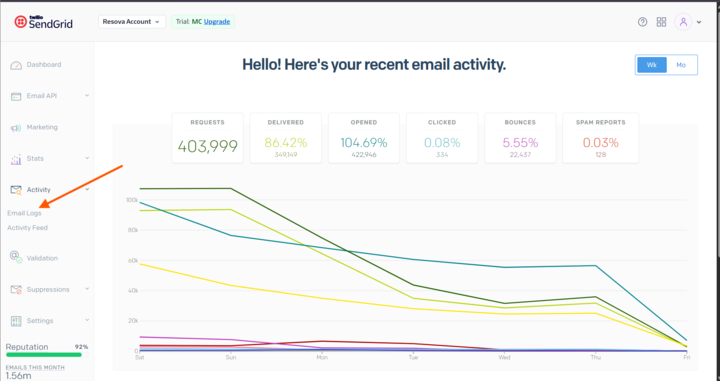
On the left side of SendGrid, click on Activity. This will expand additional options.- Click on Email Logs.
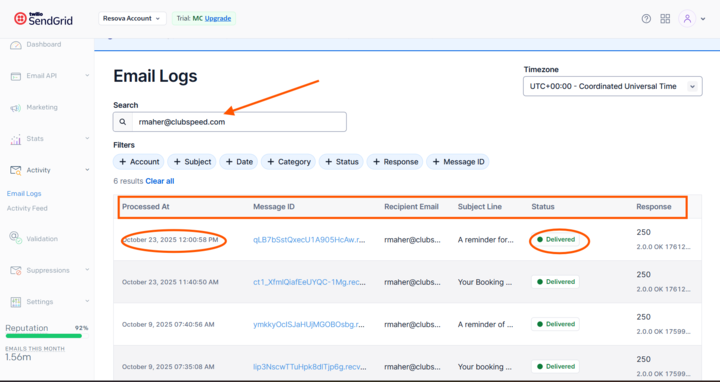
- Enter the guest’s email in the search bar.
- Above the email results, you’ll see different columns such as Processed At, Message ID, Recipient Email, Subject Line, Status, and Response.
- Look for emails with a status of Undelivered or for emails that were sent on the same day the guest should have received them.
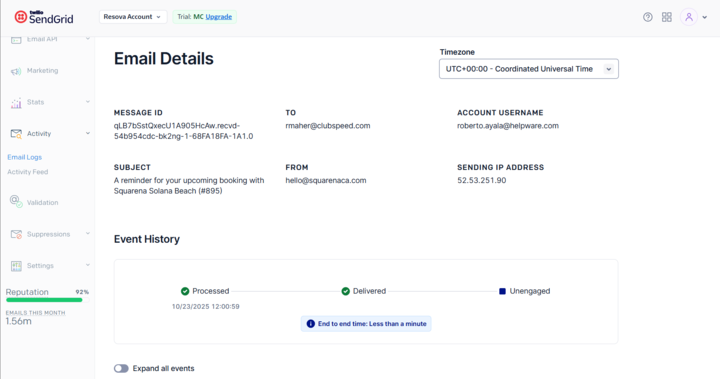
- Once you find the relevant email, click on the Message ID. Here, you can view the full history of the email and see all reasons why it wasn’t sent.
- If no results appear for the searched email, it is likely that the guest has unsubscribed from emails. For further guidance, please refer to this KB:
Guest Unsubscribed Email Reference
Note:
SendGrid does not retain email information beyond 30 days.