
Method 1 — Check Version Table in SSMS
Follow these steps to view the version history directly in the database:
-
Log in to the customer’s server.
-
Open Microsoft SQL Server Management Studio (SSMS).
-
Connect to the appropriate SQL instance.
-
Expand Databases.
-
Locate and expand the database named ClubspeedV8.
-
Expand the Tables folder.
-
Locate the table dbo.Version_CS.
-
Right-click dbo.Version_CS → select Select Top 1000 Rows.
Reviewing the Version History
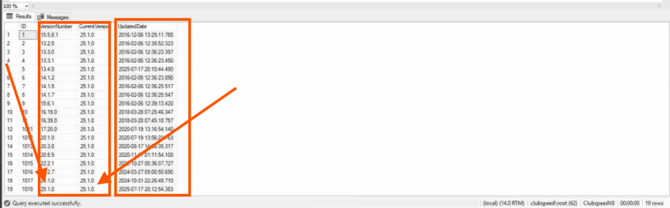
The table displays all previously installed Clubspeed versions and the dates they were applied.
-
The most recent entry (bottom row) represents the currently installed Clubspeed version on the server.
Method 2 — Quick Query (Recommended)
For a faster check, run the following query:
FROM dbo.Version_CS;
This returns the currently installed Clubspeed version directly.
Notes
-
Database name: ClubspeedV8
-
Version table: dbo.Version_CS
-
Column containing version: CurrentVersion
Summary
To confirm a customer’s Clubspeed version, check the dbo.Version_CS table in the ClubspeedV8 database. The latest record indicates the active version installed.