
Overview
Clubspeed allows venues to send marketing or promotional emails to customers using customer filters and automation tasks. This can be used to automatically send birthday promotions or reminders to guests whose birthdays are approaching.
By applying the correct birthday filter and configuring the automation schedule, you can have emails send automatically without manually running the campaign each time.
However, it is important to configure the timing carefully to avoid sending the same email multiple times to the same customer.
Step 1: Filter customers by birthday
-
Navigate to the Customers section in SP_ADMIN.
-
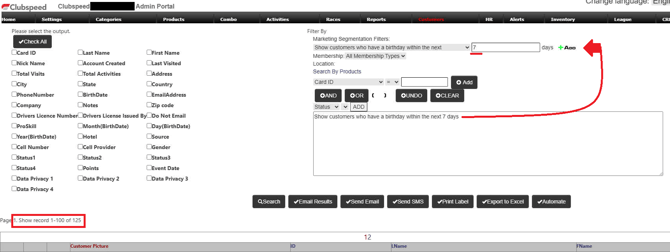
Open the Filter options.
-
Select a Birthday-related filter, such as:
-
Birthday today
-
Birthday within the next X days
-
Birthday this week
-
For example:
If you select Birthday within the next 7 days, the system will return customers whose birthday occurs within the upcoming week.
Step 2: Create an automated email task
-
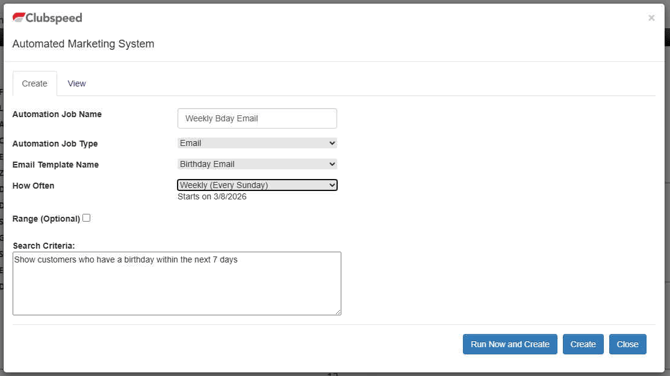
After applying the filter, select Automate.
-
In the automation window:
-
Choose the Email Template you want to send.
-
Configure the automation frequency
-
-
Save the automation.
Once saved, the automation will run based on the schedule you configured and will send the email to customers who match the filter at that time.
You can review and manage automation tasks in the View tab within the automation window.
Important: Avoid duplicate birthday emails
Clubspeed automation works by re-checking the filter each time the task runs.
If the same customers still match the filter on the next run, they may receive the email again.
Example scenario:
-
Filter: Birthday within the next 60 days
-
Automation frequency: Daily
In this case, customers could continue matching the filter for multiple days and may receive the same email more than once.
Recommended configurations
To ensure customers receive the birthday email only once, most venues use one of the following setups:
Option 1: Send on the customer's birthday
Filter:
Birthday within 1 day
Automation frequency:
Daily
Option 2: Send a birthday reminder
Filter:
Birthday within 7 days
Automation frequency:
Weekly
These configurations ensure that once the birthday passes the filter window, the customer will no longer match the automation rule.
Custom scheduling limitations
Clubspeed automation allows tasks to run on specific days or frequencies, but it does not currently support recurring intervals such as every 60 days per customer.
Because of this, birthday campaigns should be configured with shorter date windows to prevent repeat emails.
It is possible to specify:
Daily
Weekly
Monthly
Annually
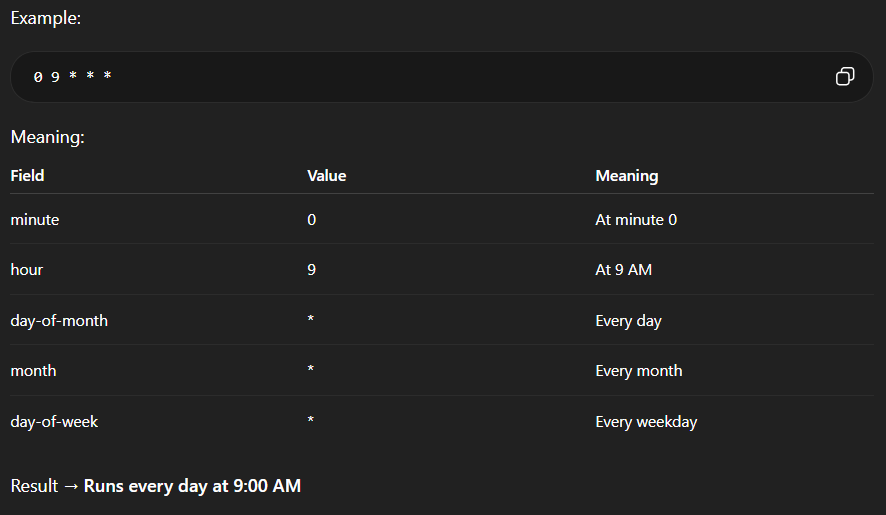
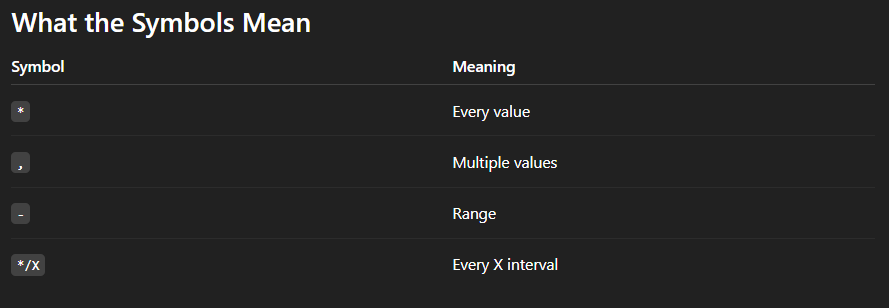
If you use Custom, you are able to specify a specific day per each month at a specific time.
minute hour day-of-month month day-of-week
Example input for First Day of Every Month:
0 9 1 * *
Meaning:
-
9 AM
-
On the 1st day of each month
Best practice
For birthday promotions, most venues:
-
Send the email on the birthday or within 7 days before
-
Use a dedicated birthday email template
-
Run the automation daily or weekly
This ensures customers receive the message once and prevents accidental repeat emails.